Pages

Tuesday, May 29, 2012

Flash vs. HTML5


HTML5 is hot.  The echo chamber is loud and everywhere you turn; blogs, social media, trade magazines, and corporations, are heralding it as the silver-bullet for everything—and more. It’s magical.
But what is the current reality of HTML5 for Advertising Agencies and their Digital Production partners? And what does it mean for those concepting and developing real client campaigns with real business goals? The question isn’t “Is Flash Dead?” But rather “What’s the best solution to this problem?” Both HTML5 and Flash are amazing solutions to our web executions, each with their own pros and cons.

Let’s Flash-back
It’s difficult to have this discussion without first looking at Flash and where it has fit into the picture for the past decade. After all, this is what HTML5 is slated to replace:
For the agency teams working on a digital concept for the next big campaign, targeting Flash as the development platform meant they could focus on the concept and creative rather than the technology.  Once Flash had matured, there was a solid track record of prior art showing that just about anything they could come up with was possible and could be built by the right production partner. And if there wasn’t a clear way, the best developers would come up with one. Papervision 3D was a great example of that. Flash did not have 3D capabilities built in, but the top developers in the community made it happen. And when they did, 3D in Flash was now possible in every browser on every operating system, immediately.
It was a great ecosystem for those involved.  Creatives could come up with big ideas and feel confident they were possible, without having to worry too much about the technology.  Developers were pushed to do some amazing work and often did amazing work on their own, which lead creatives to great new ideas.  One developer invents PaperVision 3D, another one figures out Augmented Reality Markers and next thing you know we have a live Big Foot interacting with you live on your webcam (www.livingsasquatch.com).
With any new project brief there are several things we want to look at to decide if it is a project we’d want to pursue. The core of which are:
  1. How will we do it?
  2. How much time will it take?
  3. How do those two items compare to the available budget and timeline?
Budgets will vary, but timelines are rarely long enough.  Flash gave us the luxury of predicability.  We could predictably estimate the time a project would take and the development techniques used to achieve the end result were generally clear.  Rather than targeting and customizing a launch for a slew of unpredictable browsers, we are only targeting one platform: the Flash runtime, which will run with 99% consistency across all browsers.
And we knew that rarely would someone come to us with a crazy cool idea that wouldn’t be possible. Whether it involved 3D, user generated content, webcams, sound, microphones, interactive video, Facebook integration, or whatever other wild campaign ideas our partners or us dreamt up. It was rare that we felt limited by technology when targeting the Flash platform.

The HTML5 catalyst
Mobile has been the true driver of HTML5 on the desktop and elsewhere.  Without the success of the mobile platform, pioneered by Apple, then followed by Steve Jobs infamous words against Flash, the methodology of how sites should be built for the desktop would not have changed from 3 years ago.
Prior to mobile’s success, there have always been sites with requirements making them best suited for HTML.  They are easy to identify and usually are heavy on content, light on interactivity, animation, sound, and video.  Because these are generally simple sites, browser incompatibility tends to require minor work arounds and has limited impact on time and budget. On the flip side, for any site intended to be highly interactive, Flash was always the clear choice. Allowing you to develop freely, forgetting about browser compatibility.  However, now mobile is big and must be considered with most projects, and Flash usually isn’t an option on mobile browsers.

Is HTML5 the Flash Killer?
So here we are today where a belief has been manifested that HTML5 can do everything that Flash can do and it works the same across desktop and mobile. So Flash is dead?  An article on a popular blog was recently linked to in my twitter feed, it proposed a list of “7 Killer Flash sites that should be remade with HTML5 and CSS3.” (http://tnw.co/wJfrjm)
Unfortunately this isn’t a reality and articles such as this continue to spread a fallacy of HTML5 being the new answer for everything. It remains far more complex of an issue and HTML5 cannot do everything Flash can.  In reality trying to create these sites in HTML5 is more like “Mission Impossible” and most of them would need to be re-concepted from the ground up; with creative and user experience design that was tailored to HTML5′s capabilities.  Could the ’Ethan Hunt’ of HTML5 Development pull it off? Maybe in a few cases, but what would be the cost and what percentage of the target audience will be able to view the site?  I know that with Flash sites, most clients were unwilling to allow a site published in the latest version of the Flash player until it reaches higher that 95% penetration.  Will a WebGL site that 50% of your visitors can use really be acceptable?  And we’ll often get briefs for Flash projects that have as little as a two or three week development timeline. Good luck with that in HTML5.
Ironically, most of the cutting edge, Flash-like HTML5 sites you see these days don’t work on tablets or smart phones either.  They either use HTML5 features that aren’t available in mobile browsers (WebGL), offer poor performance (Canvas),  or the layout and user experience design does not work properly.  This is perplexing since the primary argument for dropping Flash is compatibility on Mobile.
The technology aside, there are other fundamental problems with trying to make one site fit all. Screen resolutions are all over the place. Can you really expect to design something for a  22″ desktop screen that will look good on a 10″ tablet (iPad), a 7″ tablet (Kindle fire) and 3.5″ screen (average smartphone)? You also may not want the same amount of content on your mobile site, as lots of people like to find necessary information quickly and prefer more immersive experiences on a large screen when they’re sitting comfortably.
Finally, you have the point-and-click world versus the touch-and-slide; this will affect everything from the size of a button (you’d make it larger for a finger than for a mouse cursor) to the user experience (sliding through a photo gallery on an iPad is a lot easier than clicking and sliding images with your mouse on a desktop site).
The best-case scenario would be to have the time and budget to create a specific site for each target. The best smartphone sites out there were designed specifically for the small form factor. That can be said about the best tablet sites (and apps), as well as the best desktop sites. This is rarely a realistic option for client budgets, though. We believe that right now when budget is a factor (and it almost always is), your best bet is to create 2 versions of a site. Target 2 platforms/devices with 1 version. Example: Make a HTML5 site that looks great on your desktop and works well on your tablet, then make a specific smartphone only site. Or, make a basic HTML site that works fine on tablets and smartphones, then make a specific desktop-only site that breaks the mould and delivers a unique experience. And in this case, why not use Flash?

The Graceful Degradation
We’ve noticed an interesting phenomenon as a side effect of the HTML5 buzz explosion.  Industry folk and the developer community seem to be expecting and accepting less from HTML5 sites than their Flash brethren.  Essentially, it takes far less robust of an end user experience for an HTML5 site to receive critical acclaim than with a Flash site; a sort of “HTML5 Affirmative Action.” You can see this in examples such as this: You have two “Graphic Novel” themed sites. The first an FWA award winning HTML5 site on January 30th, 2012 (http://www.soul-reaper.com/). The site features lovely illustration and a single auto scrolling page with some simple animations; continuing the “Single Scrolling Page” theme we are becoming accustomed to seeing day in and day out. To the non-techy end user, this is a nice looking site, but it doesn’t offer much in the way of an experience. Now compare that with the second “Graphic Novel” themed Flash site from 2009: Team Geist. Also an FWA award winning site, it features a uniquely concepted game that combines Live Action Cinema, 3D, Visual Effects, Game Strategy, Social Integration, all in a tightly woven package built in Flash. It required a large production and development team across multiple disciplines; as seen in the Behind the Scenes features here: http://www.northkingdom.com/case-studies/adidas-teamgeist/.
Truth be told, this has actually created a solid advantage for using HTML5 as a means of generating buzz in the developer communities. It takes far less of a commitment of time, resources, and innovative thinking to create a site deemed buzz and award-worthy (though a chunk of time will now need to be devoted to debugging and browser compatibility solves).  This, however, assumes your target audience are those in the community around you, who care mostly about the trends and the nitty gritty tech of how a site was built. If that is not your target audience, then you may not be meeting your client’s goals of reaching a larger non-tech savvy audience. How long this phenomenon will last is still uncertain.  If the innovation hits a ceiling due to technical limitations or continued browser limitations, we could see a shift back before the next 100 parallax scrolling single page HTML5 sites hit the web.
.NET magazine recently released an article about the “15 top web design development trends for 2012” in which seasoned designer Tom Muller predicts Flash will surely survive, certainly in the near-term. He explains that during 2011, he was involved in 3 major projects that relied on Flash, simply because it remains the best tool for interactive video, animation and 3D online. He added, “Web designers and developers sometimes lose sight of what works and is demanded by a larger audience, due to preferring what’s considered ‘cool’ in their bubble”, and that “More big brands will shift from Flash, testing the water with HTML5 and CSS3 for focussed campaigns. But for entertainment sites, Flash is – and will remain – the predominant tool of choice to create engaging experiences.”
One certainty in HTML5′s future is that the pace of innovation will be slower than anyone would like.  Instead of a situation where we rely on one company to innovate and release new features (in the way that Adobe does with Flash or Apple does with iOS), we are relying on a standards board to decide on features and then four browser manufactures to implement them.
Furthermore, once the browser manufacturers implement them, users of each browser need to get the latest upgrade. And finally, with each browser comes a new set of bugs that developers need to create work arounds for.  For an inside look at how convoluted the web standards process can be, have a look at the following excerpt from the book HTML5 For Web Designers – by Jeremy Keith.  The excerpt is from the opening of the book and details how HTML5 came to exist, it describes all the infighting going on behind the scenes. It is a true nerd war, including the big decision on whether it should be “HTML5″ or “HTML 5″ with a space.  Critical stuff.
For developers we have sites like http://html5please.us/ which tell us the features of HTML5 we can safely use and those that are broken or don’t work in specific browsers and need fallbacks. And while this site may be seen as a handy resource for developers, the fact that it exists at all should be a warning to anyone seeking to have a cutting edge HTML5 site developed. To look at this from another perspective:  Can you imagine if you wanted to build an iPhone application and as you dug in and referred to Apple’s documentation for various functions, you discovered that 80% of them didn’t work properly and you had to use work arounds, or did not work at all? That would be completely unacceptable. The reality is that closed development platforms such as iOS or Flash provide developers with an enjoyable and predictable experience.  If a bug arises with a feature of the platform, you only have to find a work around for one platform, not several browsers on two different operating systems.  Furthermore Apple and Adobe fix these bugs quickly in next release of their runtimes.  In HTML5 you rely on multiple browser manufacturers to fix bugs and broken features, and often this can take years. As in cases where Microsoft took as many as 10 years to fix a small issue.
The development community eventually comes up with work arounds as you can see on the html5please site, but what happens in the middle of a project when you discover a bug across multiple browsers that hasn’t been uncovered and solved by the development community?  Is everyone prepared to add weeks to a project timeline, and the correlating cost, to accommodate such scenarios?

A Hole In HTML5’s Video Armor
The HTML5 video tag is another good example of these headaches.  I’m going to single this out since so many of the award winning Flash sites of the past 5+ years have relied on video for the overall experience (Live Action and/or rendered video animations). And simply playing video in a self contained player is unarguably one of the core requirements of web sites, yet it is still extremely convoluted and time consuming to implement in HTML5.  Previously in Flash you simply rendered out one video file and loaded it in to play in your Flash video player.  It was guaranteed to work for 98% of desktop users.
Today with Mobile and HTML5 in the mix it is no longer so streamlined. Developer and author, Robert Reinhardt, recently wrote a blog post titled “The World of Pain that is HTML5 Video”  in which he discussed the issues with HTML5 video. At the core of it is the fact that the various browser vendors are pushing different encoding formats and there is no single format compatible with the current popular browsers; meaning you have to encode three different videos for desktop and then also mobile versions.
On a recent project we had roughly 30 different video animations in queue at any given time.  Having to encode three different versions of each, every time a creative revision came in, would have blown up our pipeline and caused us to miss deadlines.  You can just skim his blog post to get the idea of how complicated this issue is and in the end his conclusion is that currently the best strategy is Flash video on the desktop with fallback to HTML5, allowing you to encode in one format.  But this still relies on Flash to simplify things. If your site experience relies on using interactive or alpha channel video (pretty much anything other than playing video in a standard player), forget HTML5.  I personally know how complicated programming Flash video interactivity for a site can be, like our www.bankrungame.com site for example, and trying to do something like this in HTML5 will be 10 times more difficult; if not impossible in its current state.

In Closing
What we’ve tried to do is give a realistic look at what it will mean to target HTML5 for upcoming campaigns.  Based on the current buzz around it, people may not have a clear idea of the challenges involved with working around its limitations.  You want to make sure you chose the right tool for the job.
HTML5 is here to stay and often it will be the right tool, but if you try to force the technology on a project its not right for, it may come back to bite you.  Possibly via missed deadlines, budget overages, poor metrics due to limited compatibility, or a campaign that goes live full of bugs and a phone ringing off the hook with an upset client.
It may feel like overall tone of this article is negative on using HTML5.  That’s not the case, as we think it’s a great option for the majority of sites on the web. We simply aren’t excited about it as a definitive replacement for Flash.  HTML5 in its current state allows us to do less creatively with far more work, so we prefer the absolute creative freedom that platforms like Flash or iOS provide. We also don’t care about web standards.  Not to say they don’t have importance, but it is not what we are focused on. We are focused on concept, execution, and doing work that is motivating and enjoyable. Strategically we’ll continue to develop our HTML5 portfolio and use it when it makes business sense for our clients. Though we would be more excited about it if it allowed us to create end-user experiences that hadn’t already been possible at some time in the last decade.
Finally, here are a few logical guidelines when considering a strategy for new campaigns:
  • Don’t decide on the technology until you figure out your audience. Is the primary target mobile or desktop? What percent of your audience is on HTML5 compatible browsers?
  • Figure out your clients goals. Are they ok with you targeting a smaller audience for the sake of industry buzz and awards? Or are they more concerned with overall reach to consumers.
  • Creatives concepting HTML5 sites need to learn more about the technology and limitations.  You can’t assume everything you would have concepted for a Flash targeted site will be possible in HTML5.  Especially if it is running on tablets and smart phones.
  • If the goal is a highly interactive site on the desktop that will reach a maximum audience, use Flash.
  • If a site uses interactive video and/or alpha channel video, use Flash and don’t expect the same type of experience to be possible on mobile.
  • If the site only requires basic animations (think animating layers of a photoshop document) and video in contained players, use HTML5.
  • Deep content/copy heavy portals, corporate sites, and blogs should be HTML. This has always been a good rule.
  • If the same site needs to work on the desktop and tablet expect less (in terms of interactivity, animation, and innovative UX).
  • If the same site needs to work on the desktop, tablet, and smart phones, expect a lot less.
  • Be careful not to expect a robust HTML5 site to be built on a tight timeline. Extra time will be needed for build and more importantly QA/bug fixes. i.e. Don’t plan on approving creative two weeks before a site needs to go live.
  • Understand that not all HTML5 features are created equal. Some work on mobile, but not desktop. Some work on desktop, but not mobile.  WebGL is a good example.  Currently it is not enabled in mobile browsers and Internet Explorer on the desktop.

Sunday, May 27, 2012

GIS Mobile Developers


Is geo-spatial or location based mobile application development just a niche? Maybe most application development companies are focused on general mobile app development? Perhaps its because mobile is so new, that both clients and software development companies are still trying to fit mobile into their overall plan.

Mobile Location Services

The mobile location sector is very fragmented at the moment. On one side we have ESRI, the worlds biggest GIS company. They were slow in entering the Web, they are moving quicker with mobile, but their world remains GIS focused. And that is a niche no doubt. They have yet to broaden their appeal beyond their core, mostly public, GIS community.

Mobile Application Development IPad
Figure 1: ESRI ArcGIS running on the IPad

The location based sector is more dynamic. Its somewhat a bubble at the minute, with tonnes of VC money pouring into some frankly daft ideas. But there are some gems within that world. Like the dot com boom and bust, many will fall but some real innovation will come from this sector. There are huge opportunities to build location based applications, classed as location based services (LBS), to use in marketing, advertising and beyond on mobile devices. At present this sector is narrowly focused on consumers. Broadening solutions to the enterprise offers mouth watering possibilities. Figure 2 below shows a mobile check-in and data collection application which allows field service techs, surveyors, water utility workers, indeed any workers in the field to utilize mobile in their daily work routines.

MapQuest have an interesting offering. They were one of the the earliest companies to put maps on the Web. Initially focused on routing/directions, and traffic, they have broadened their offering to to include local search, marker and map overlays. In October they announce their Flash mobile API release. This is a big deal. More about Flash in a minute. But the MapQuest offering is in many ways made for mobile. Imagine being able to access routing and up to date traffic information while on the road. Look ahead and see accidents on your route and avoid them. Conduct local searches; find venues near you. Overlay KML and GeoRSS markers on the map to see points of interest (POI). Tonnes of possibilities.
Mobile Application Development MapQuest Flash API
Figure 2: MapQuest Enterprise Check-In and Data Collection App

Location Based Cross Platform Mobile Development

Objective C has become one of the most in demand programming languages. This relates to the popularity of Apple mobile devices. Most of the apps in the Apple App Store are written in Objective C. Successful mobile application development shops are filled with Objective C developers. But the game is changing. Android, and other mobile platforms are becoming increasingly more popular. Where does that leave your beautiful Objective C application? Only running on Apple products that’s where! You’ll need to rewrite it for Android, BlackBerry, Windows!

Now, thankfully there are cross platform solutions. Two of the most notable are Adobe AIR and PhoneGap. With AIR you can take your existing Flex or Flash apps and convert it to a mobile applications. Or build your AIR mobile app from scratch. But, most importantly, run the app on all mobile platforms. With PhoneGap take your Javascript application and do the same. That is one code base, which runs across mobile platforms. Simple.

Geo-Spatial Cross Platform Mobile Development

We have digressed slightly from our original topic. The future of mobile is very interesting, and filled with opportunities. Location will be at the core of many, if not most mobile applications. One day it might be pointless for companies such as us to target location based cross platform application development. But at the minute it seems to make tonnes of sense. Mobiles devices are computers with ever changing locations. Taking advantage of location to provide dynamic data – traffic ahead, what or who is near me, analysis by current location – has endless possibilities. Cross platform too. Who has the money or time to build multiple versions of the same application to run across each mobile platform? Build it once and deploy it to all would seem to be the future.

We might be wrong. But we are going to stay focused on cross platform location based mobile application solutions.
Source:GISCafe.com

GIS Mobile Development: Flex or HTML5?


JavaScript not Flex/Silverlight — Yeah, it isn’t much of a surprise, open source users aren’t big Flex or Silverlight users, but JavaScript HTML5 web apps are everywhere and doing everything Flex/Silverlight can do, but work everywhere …. At this point it is safe to call every Flex/Silverlight location app as legacy as nobody in their right mind would be coding with those tools in 2012.”


“Ditching Flash for HTML5 feels like the right choice for us for a number of engineering reasons.

1. The exact same HTML5 documents work on the iPhone / iPad, Android phones/tablets, and modern desktop browsers. This is great from an operations perspective. This saves us from extra storage costs, and maximizes the cache hit ration on our CDN (since a desktop request fills the cache for a mobile request, and vice-versa). It’s also great from a software engineering perspective, because we can put all our energy into supporting one format and making it really great.

2. Documents load 30% faster and are 40% smaller. ‘Nuff said on that front, faster is ALWAYS better.

3. The documents are semantic and accessible. Google can parse it and index the documents, and so can any other bot, scraper, spider, or screen-reader. This means that you can write code that does interesting things with the text on the slideshare pages. You can even copy and paste text from a SlideShare document, something that was always a pain with Flash.”

These types of discussions have been going on since the dawn of the Web. New technologies replacing old. The advent of mobile certainly presents new challenges, and may well alter the landscape. But the end of Flash or Flex has been called wrongly so many times.

Adobe are an innovative company. There are ever more developers moving over to learn and use their Flex and Air products. And frankly, as somebody who has worked with these technologies since their inception, they are just fantastic for building the next generation of Web and mobile apps.

But will the decision by both Apple and now Windows, to not allow plug-ins on their mobile browsers end Flex as we know it? Remember Flex needs the Flash plug-in installed to run in any Web browser. 

At the moment Flex development continues strongly on the the PC based Web, where the Apple and Windows restrictions do not apply. HTML5 development continues in parallel. But, as many of us continue to believe, if mobile devices do take over from the PC, the mobile Web may well be all about HTML5.

Adobe Air started out life named Apollo. When it was launched, many in the development community could see the thinking behind the release, but never a good place to build Air apps in the PC world. 
That has all now changed. 

Air is an installed application, not relying on any browser plug-ins. Mobile Air offers the only cross platform mobile (installed) solution on the market today. No more building mobile apps in 3 different languages or more for each mobile platform. One code base runs on Apple IOS, Android and Blackberry. No need for third party conversions as provided by the likes of PhoneGap for HTML5. Adobe mobile Air apps are both fast and able to interact directly with native code.

Adobe Air and Flex are nearly identical. So looking forward, if Flex becomes less popular due to business decisions made by Apple and Windows; Adobe Air is about to see enormous growth. So maybe there is some truth in those who say its the end of Flex. But its just the beginning of Adobe mobile Air!

Friday, May 25, 2012

The Best IDE For ArcGIS API for JavaScript, HTML5 with Code assist


1.Aptana Studio 2

If you want to do some professional development then Aptana Studio would be a decent choice and best of all, it’s free! You can use Aptana as a plugin with your Eclipse or you can download the standalone Aptana Studio. If you already use Eclipse then the Aptana plugin would be the natural choice.
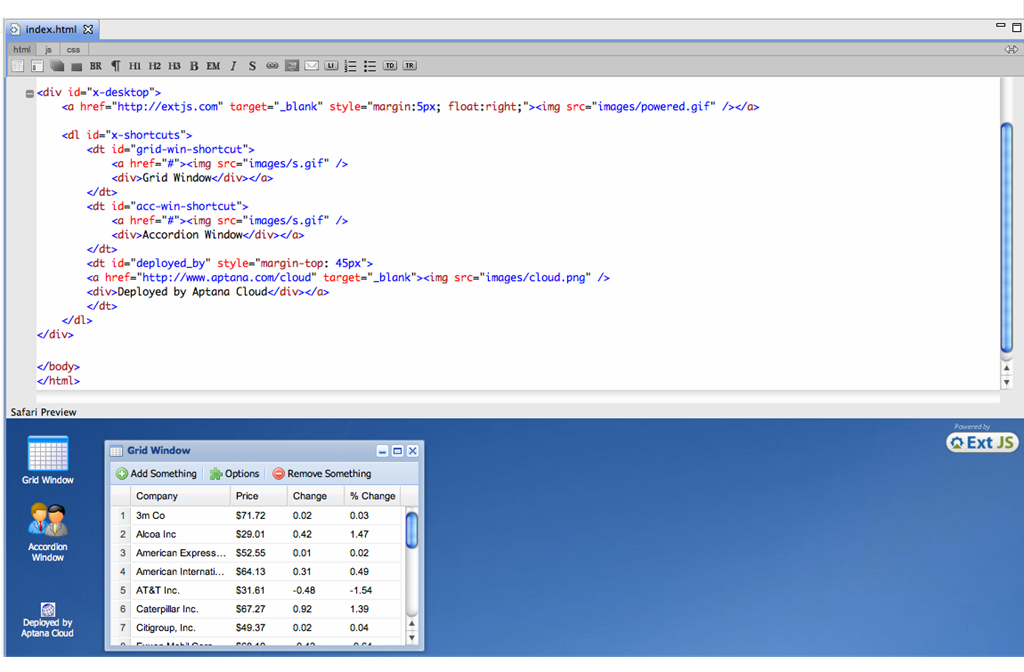
aptana_javascript_studio
Aptana Studio is pretty simple compared with Visual Web Developer + VS2010. You can Debug your JS using Firefox+Firebug. What’s really cool about it is the support for popular JS libraries like Dojo, Yahoo! UI etc. If you’re planning on using 3rd party JS libraries then you should choose Aptana Studio. It also comes with a nice FTP client integrated into it which comes in handy when you want to do live-development. Moreover, you can also preview your JS in action right inside it using the integrated browser view (it supports IE, Firefox and Safari).

With Aptana Studio 2 installed, there still are some steps to getting it set up to perform code assist. The ArcGIS JavaScript API is build on top of the Dojo Toolkit. As a result, support is needed for both Dojo Toolkit and the ArcGIS JavaScript API.

Setting up Dojo code assist can be accomplished by installing the plug-in directly from Aptana Studio. Go to Help > Install Aptana Features. In the dialog, expand the JavaScript Libraries section, check the box next to Dojo and click the Install button at the bottom of the dialog. Aptana will download and install support for Dojo. Code assist is now working for the Dojo Toolkit, but support for the ArcGIS JavaScript API still needs to be installed.
To get code assist working for the ArcGIS JavaScript API, a jar file needs to be downloaded from Esri and installed into Aptana Studio. The download and installation directions can be found on the ArcGIS Resource Center as well. There is only one problem. The directions are for setting up code assist if you have installed Aptana as part of the larger Eclipse IDE. This was not the case for me. I installed it for only myself on the computer. It took a bit of exploration to figure out how to get this installed correctly.
Successfully installing this jar file requires unzipping the zipped archive, copying the jar file into the Aptana plugins folder and enabling it in Aptana. If like myself and installing Aptana for only the current user, the plugin folder can be difficult to locate. Instead of being located in the C:/Programs directory where all other programs installed on a Windows computer are, Aptana is installed in C:/Users//AppData/Local/Aptana Studio 2.0. Inside this folder is located inside the Aptana folder at C:/Users//AppData/Local/Aptana Studio 2.0/plugins. Copy the jar file from the zipped archive downloaded from Esri into this directory.
With the jar file copied into the plugins directory, enable the plugin from within Aptana Studio. Go to Window > Show View > References to open the References dialog. In the References Dialog, open the Global References and check the box next to ArcGIS JSAPI.
This is what it takes to get an IDE with code assist for working with the ArcGIS JavaScript API: download and install Aptana Studio 2, enable the Dojo plugin, download the jar file from Esri, copy the jar file into the plugins directory and enable the JSAPI plugin. Although it takes a bit of tinkering to get it done, the upside is this IDE is completely free and provides code assist for the API I prefer to learn.

Download and Install
  1. Download and install Aptana Studio.
  2. Install the Dojo plug-in using the Help > Install Aptana Features menu option. In the Aptana Features dialog expand JavaScript libraries and select Dojo to install the Dojo libraries.
  3. Download and install the JavaScript API code assist plug-in from the ArcGIS Resource Center.


2. Visual Studio 2010 with Visual Web Developer (Windows)

If you’re already writing your code in Visual Studio then this would be an ideal option. Visual Web Developer does not come by default in the VS 2010 installation so you will have to add it separately. To start off with, you can download and install the Express edition (free) of Visual Web Developer from here. Not only can you write and debug JS in VWD 2010 Express but you can also write RIA (Rich InternetApplications), WPF (Windows Presentation Foundation), in fact write a complete web-application.
Visual_Web_Developer_2010_Javascript_editor

3. Firefox + Firebug (Windows, Linux, Mac OS X)

If you do not want another heavy installation and just want to write plain JS and test it right inside your browser, you can do that with Firebug installed over Firefox. If you do not have Firefox then downloadinstall the latest version (3.6.13 at the time of writing this) and then download and install the Firebug plugin for Firefox from here (Or you can go to Tools –> Add-Ons –> Get Add-Ons and type in Firebugand install it). This is by far one of the most popular and most download Firefox Add-on too which speaks for itself.
Here’s a simple starter for writing and live-debugging JS using Firebug:
Fire up Firefox and open the JavaScipt that you want to inspect and debug.
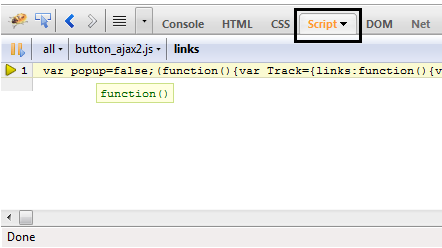
If you have installed Firebug then a small bug icon will appear at the bottom-right corner of Firefox, that’s where you will open Firebug right inside Firefox. Since we’re inspecting JS, you need to click theScript button in the Firebug button panel:
firebug_script_debugger
You can set break point, conditional breakpoints and also profile your JS in addition to a couple of other features. This is a nice place to get started with Firebug.
Since Firebug does not include a Text Editor in which you can write code but you can add any text editor (preferably Notepad++) by going to Tools –> Firebug –> Open With Text Editor –> Add New Editor


 4.Komodo IDE (Windows, Linux, Mac OS X)

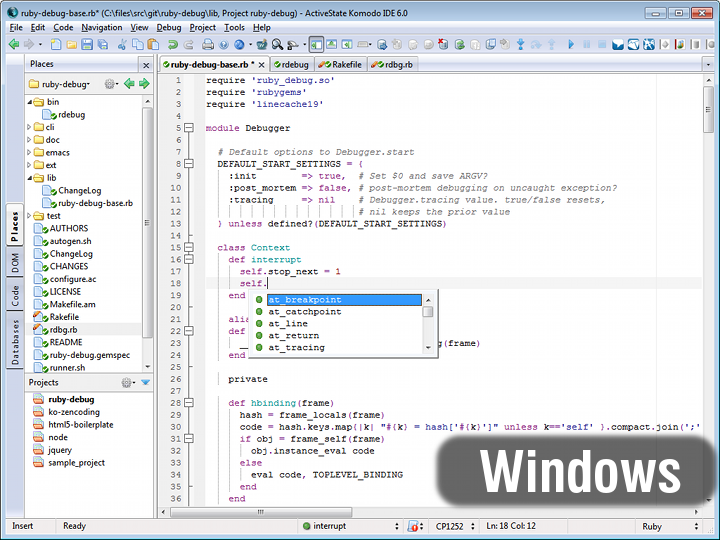
Even though Komodo is not free but it’s worth your money if you write JS (or web apps for that matter) for a living. Komodo IDE comes packed with a code editor that supports almost every language in which you can write web apps. Besides all the usual features you can integrate almost any source control into the IDE. It also includes Database Explorer which lets you dig into your website’s database right from the IDE. If you’re developing web apps then you know how handy this could be. You can find the whole list of features on here.
komodo_for_javascript


5. Komodo Edit (Free) (Windows, Linux, Mac OS X)

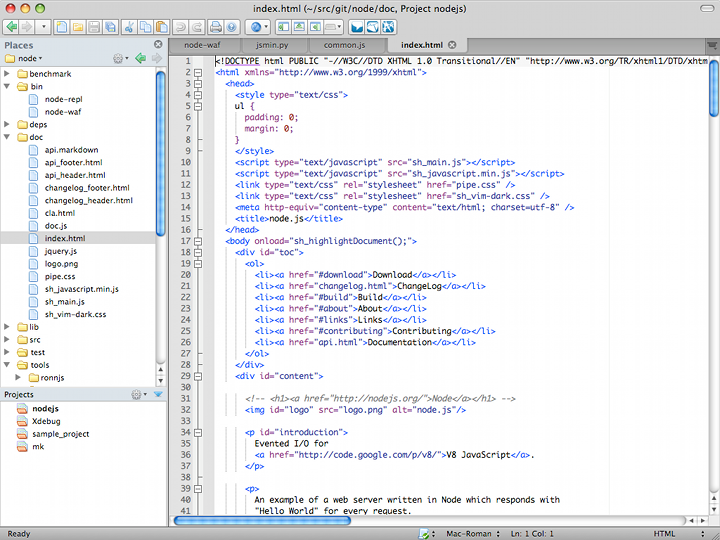
Komodo Edit is the free version of Komodo IDE minus the integrated debugger and a couple more less-important features. I would recommend trying out your hands on Komodo Edit first before going for the Komodo IDE since it would give you a feel of working in Komodo. It is free and open-source unlike the Komodo IDE. You still get a code editor, intelli-sense and it also integrates nicely with Firefox+Firebug. You can get Komodo Editor from here.
komodo_edit_mac_720


6. Eclipse + JSEclipse Plugin (Windows, Linux, Mac OS X)

JSEclipse is a nice plugin for Eclipse so if you’re already developing on Eclipse then this would be a natural choice. However, I should warn that since Adobe acquired Interakt, the company that made JSEclipse, active development has stopped on JSEclipse as of late December 2010. But still if you want to just try out writing JS then it will be a good start since it can easily integrate with Firefox+Firebug. When I say that it can integrate, what I mean is that you can use it’s source editor as a text editor for Firebug. Find out more about JSEclipse on here.


7. NetBeans (Windows, Linux, Mac OS X and Solaris)

NetBeans also has some great support for writing simple as well as complex JavaScript. It sports a source code editor with auto-complete and intelli-sense and a debugger that integrates well with Internet Explorer as well as Firefox. And just like Aptana Studio, it has extensive support for integrating popular AJAX, JS libraries like Yahoo! UI, Prototype, Script.aculo.us etc into your code. You can target your JS, in fact your complete app for the whole range of popular browsers and check separately for each browser right inside it. There’s a very nice tutorial on getting started with writing Web Services that would come in hand. You can view it here. Click here to read more about the JS support in the NetBeans IDE.
javascript_netbeans


8. WebStorm (Windows, Linux, Mac OS X)

WebStorm by the JetBrains has to be the latest JavaScript IDE. It’s light-weight and sports a JS code editor, debugger (support for putting breakpoints, conditional breakpoints, step-in, step-over etc). You can also integrate Firebug with WebStorm to debug right inside Firefox. It also has good support for writing HTML5 and just like Aptana Studio you can connect to an FTP server to sync your scripts. I wish they had support for some popular Source Control plugins since without it we cannot write largeapplications. Find out more about WebStorm’s JavaScript support on here. You can try out the 45-day trial.
JS_completion


Free GIS Cloud Publisher extension for Esri ArcMap released


A single click solution to get your maps from desktop to the Cloud!
The extension is free and compatible with Esri ArcMap 9.x and 10.x. You can download it from the following link: GIS Cloud Publisher for ArcMap (600kB)
Publishing GIS projects with traditional GIS tools is not easy. You have to set up your own server, being that a server from a commercial vendor or open-source, and follow that with maintaining the server and services, uploading your data from desktop, reconfiguring maps and generating tiles to be optimized for the Web, not to mention mobile and tablets. All these are, for the most part, daunting and/or expensive tasks.


A map in ArcMap

GIS Cloud already gives you a way to easily build and publish your maps on the Cloud, but there are still lots of maps and projects sitting on your desktops. Of course it is possible to upload all that data to GIS Cloud, but then you would have to go through the process of creating and setting up those maps once again.
We have always been focused on making your GIS workflows more efficient to save you time and money. Therefore we are releasing today a GIS Cloud Publisher extension for one of the most popular desktop GIS tools out there: Esri ArcMap
The GIS Cloud Publisher for ArcMap extension enables you to publish your maps from ArcMap to GIS Cloud with only one click. It automatically uploads your data, symbology, layer structure and spatial references. The idea is that what you see in your desktop GIS is instantly replicated on your GIS Cloud account. Once your maps and data are on GIS Cloud, they are easily published to the public or embedded into your website/blog without a need for having your own servers.


GIS Cloud Publisher Extension

Not everything is supported just yet. This is what we have so far:
  • maps and layers can be created and afterwards updated
  • you can choose which layers to export
  • your upload is secure through an SSL connection
  • all your vector data can be uploaded, regardless of the datasource
  • labels – these end up with a generic look only in GIS Cloud for now
  • point layer symbology support almost at 100%
  • simple line symbols – only solid lines
  • simple fill symbols – only single color fills
  • but! you’re free to use unique value categories or graduated color symbology

After one click your entire map with the data is in GIS Cloud:

Your desktop GIS map on GIS Cloud

Monday, May 21, 2012

ArcGIS 10.1 Deprecation Plan


ArcGIS 10.1 Deprecation Plan

ARCINFO WORKSTATION

·                     There are no plans to release a new version of ArcInfo Workstation at ArcGIS 10.1.  However, ArcInfo Workstation 10.0 will be able to be used in conjunction with newer versions of ArcGIS Desktop.  Users will continue to be able to use their existing ArcGIS 10.0 version, but we will not release newer versions.  

ARCIMS 

·                     ArcGIS 10.0 was the last planned release for ArcIMS.  At ArcGIS 10.1, ArcIMS will no longer be shipped as part of ArcGIS.  Users can continue to use existing versions of ArcIMS after this time; however, we will no longer provide new releases.  Users should develop a plan and migrate to the ArcGIS Server and Web API technology.

ARCGIS SERVER 10.1

·                     ArcGIS Server 10.1 will be the last planned release for the ArcGIS Server Web ADFs (Application Developer Framework) for both Microsoft .NET and Java. 


 Esri will continue supporting the Web ADFs during the 10.1 release cycle but only fixes to critical issues will be addressed.  No new functionality or enhancement requests will be addressed for the Web ADFs. 


 Web application developers are encouraged to move to a web services based pattern with the ArcGIS Web Mapping APIs for JavaScript, Flex, or Silverlight.

·                     ArcGIS Server 10.1 will no longer support local connections (DCOM connections) from Web ADF applications.


 ArcGIS Server 10.1 will be a web services (REST, SOAP, and OGC) server only. This will have an impact on: 


  1.  The web editing functionality of default Web ADF will no longer be supported.
  2.  ArcGIS 10.1 will continue evolving and enhancing its web editing capabilities on top of the new ‘Feature Service’ (new in ArcGIS 10) and the ArcGIS Web Mapping APIs.
  3.  Custom developed applications from business partners and users using fine grained ArcObjects through DCOM will not be supported.  
  4. Thanks to the recent enhancements in Server Object Extensions, developers can now migrate custom business logic written at the web application (Web ADF) level to custom ArcGIS Server services.  Development 

·                     against fine grained ArcObjects continues to be fully supported following the Server Object Extension pattern for extending ArcGIS Server services.


 Esri has been recommending this approach for some time already, due to its simplicity and improved performance. 


 Web ADF applications using non-pooled services will not be supported.  Over the years, some customers have adopted a pattern for their ArcGIS Server applications that use non-pooled services.  This pattern has been shown not to scale.

·                     ArcGIS Server 10.1 will be the last planned release for the ArcGIS Server Manager Web Mapping Application (Microsoft .Net and Java). 


 ArcGIS Server Manager includes a wizard for configuring out of the box web mapping applications based on Web ADF technology.


  ArcGIS Server 10.1 is the last release of the Web Mapping Application wizard in Manager.  Esri will continue supporting the ArcGIS Server Manager Application Wizard and Web Applications created with it during the 10.1 release cycle, but only fixes to critical issues will be addressed. 


 New out of the box applications based on the ArcGIS Web Mapping APIs, as well as a new experience for configuring them, will be offered as part of the ArcGIS Server 10.1 release. 

·                     ArcGIS Server 10.1 will no longer support 32-bit operating systems.  


ArcGIS 10.1 will exclusively support 64-bit operating systems. 


 Support for 64-bit native execution across all the tiers of ArcGIS Server has been a long awaited feature by many of our customers.  


64-bit hardware is the norm in today’s market and most modern ArcGIS Server deployments do in fact run on 64-bit hardware.  ArcGIS Server 10.1 will run as a native 64-bit application exclusively requiring 64-bit capable hardware.

·                     ArcGIS Server 10.1 will no longer support SUSE Linux Enterprise Server 10 and Red Hat Enterprise Linux AS/ES 4.  However, we will support SUSE Linux Enterprise Server 11 and Red Hat Enterprise Linux Server 5.

·                     ArcGIS 10.1 will no longer support the Solaris versions of ArcGIS Server (with the exception of  the ArcSDE technology component).  We will continue to support the ArcSDE component of ArcGIS Server on the Solaris platform beyond the ArcGIS 10.1 release.

·                     ArcGIS Server 10.1 is no longer support VBScript or JScript on ArcGIS Server for Linux. VBScript and JScript will continue to be supported on ArcGIS Server for Microsoft Windows.  Python scripting will be added as a replacement for these scripting languages and ArcGIS Desktop will support authoring Python scripts in areas where VBScript and JScript are presently used.

·                     ArcGIS Server 10.1 will no longer support publishing non-optimized map documents (MXD files).  ArcGIS 10.1 will only support publishing optimized maps (MSDs) as that is the best practice for map publishing.  At ArcGIS Server 10.1, optimized map services (MSDs) will be enhanced to support many of the capabilities that are currently only available through MXD-based map services.

·                     ArcGIS Server 10.1 will no longer support the Microsoft Access based Personal Geodatabase.  

·                     With the migration of ArcGIS Server to be 64-bit and because of the lack of scalability of Personal Geodatabases, we have removed support for Personal Geodatabases from ArcGIS server 10.1.  Personal Geodatabases will continue to be supported on ArcGIS Desktop.


ARCGIS DESKTOP 10.1
·                     ArcGIS 10.1 will no longer support the Solaris versions of ArcReader and ArcGIS Engine.

·                     ArcGIS 10.1 will be the last release supporting ArcReader for Linux.  SUSE Linux Enterprise Server 11 and Red Hat Enterprise Linux Server 5 will be supported.  However, SUSE Linux Enterprise Server 10 and Red Hat Enterprise Linux AS/ES/WS 4 will no longer be supported at 10.1.  We will no longer support ArcReader on Linux after the ArcGIS 10.1 release.

·                     ArcGIS Engine 10.1 will no longer support SUSE Linux Enterprise Server 10 and Enterprise Linux AS/ES/WS 4.  However, we will support SUSE Linux Enterprise Server 11 and Red HatEnterprise Linux Server 5. 

·                     ArcGIS 10.1 will be the last planned release for the ArcGIS License Manager on the Solaris operating system. Esri will continue to support the License Manager on Microsoft Windows, and Linux operatingsystems. SUSE Linux Enterprise Server 11 and Red Hat Enterprise Linux Server 5 will be supported (SUSE Linux Enterprise Server 10 and Red Hat Enterprise Linux AS/ES/WS 4 will no longer be supported at 10.1).  

·                     ArcGIS 10.1 will no longer support Microsoft Visual Basic for Applications (VBA). 

·                     ArcGIS 10.1 ArcObjects SDK for Microsoft .NET will no longer support Visual Studio 2008. Esri recommends using Visual Studio 2010 for ArcObjects development for ArcGIS 10.1.

One big drawback of ArcGIS 10.1:

There is no change in Desktop at 10.1 in regards to 64-bit support. ArcMap is a 32-bit application, but ESRI do support it running on 64-bit Windows. Currently ESRI is working on a research project for native 64-bit ArcGIS application but it is not going to make 10.1.